
Error de la válvula
What Is a Valve Error?
A Valve Error is a system warning indicating that the manual knob on your Moen Flo Shutoff may not be fully in the Open or Closed position, or that the valve position may not be properly synchronized with the Moen Flo App.
The indicator light on the right of the Moen Flo Shutoff shows whether the valve is open, closed, in transition or experiencing a valve error.

Valve Indicator Light Status
- Green Indicator Light: Valve is Open
- Red Indicator Light: Valve is Closed
- White Indicator Light: Valve Error, valve is stuck between Open and Closed
- Blinking White Indicator Light: Valve is in transition or is turning
- Blue Indicator Light: The white indicator light may appear blue to some users. Blue is not a separate indicator light color and is not listed in the product documentation. This is the white indicator light, not a separate blue light or status.
When a Valve Error is present, your Moen Flo Shutoff may not operate as expected, which could affect your home's protection from water damage. It is important to troubleshoot this issue as soon as possible.
How to Troubleshoot a Valve Error
1. Open and Close the Valve From the App
From the Moen Flo app Control Panel, try opening and closing the valve.
If the water control toggle is unavailable, dimmed, or the valve does not respond, continue with the following troubleshooting steps.
2. Inspect for Debris
Examine the manual knob and surrounding area on the Moen Flo Shutoff.
Remove any debris such as leaves, dirt, twigs, or small stones that could prevent the valve from fully opening or closing.
3. Verify the Manual Knob Position
Confirm that the manual knob is fully turned to either the Open or Closed position.
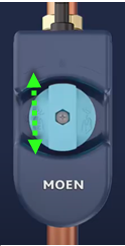
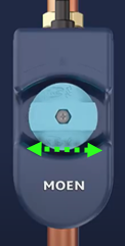
- Open Position: The knob is aligned with and runs in the same direction as the pipe.
- Closed Position: The knob is perpendicular to and runs across the pipe.
If the knob is not fully aligned with or perpendicular to the pipe, manually turn it until it reaches the complete Open or Closed position.
| Abra | Cerrado | Incorrect Position |
|---|---|---|
 |
 |
 |
Using the Manual Shutoff
- Locate the green or blue manual shutoff knob on the Moen Flo Shutoff.
- Insert the supplied hex key into the hex cutout on the knob:
- Use a 5/16-inch hex key for 3/4-inch Moen Flo Shutoff devices (model number: 900-001).
- Use a 3/8-inch hex key for 1 1/4-inch Moen Flo Shutoff devices (model number: 900-002).
- Push the knob down completely.
- While keeping the knob fully depressed, turn it one-quarter turn clockwise or counterclockwise until the knob reaches the Open (green indicator light) or Closed 9red indicator light) position described above. As the knob is being turned, the light will be blinking white.
4. Power Cycle the Device
For complete instructions, see How To: Restart Your Moen Flo Shutoff.
If the Valve Error remains after the device restarts or the valve indicator light stays white, contact Moen Flo Support.
Preguntas frecuentes
I received a Valve Error message after an Unusual Activity alert. What could be causing this?
Example of Valve Error message sent from Moen Flo Shutoff Valve:
On April 9 at 4:22 pm, we noticed your Smart Water Shutoff may not be working properly. To troubleshoot, we recommend restarting your Moen Flo Shutoff by going to the System Settings in the Settings section of the Moen Flo app, then clearing this alert. If you see this alert again, please contact Flo support as your device may have malfunctioned.
This type of error message may indicate that the valve was unable to fully close when responding to the detected activity. The valve position may not match the commanded position, which can trigger a Valve Error.
For Additional Technical Support
If you have completed all troubleshooting steps and:
- The valve does not actuate or turn automatically
- You hear clicking from the device when it attempts to operate the valve
- The valve can only be operated manually
- The valve indicator light remains white
If you notice an active leak, immediately take steps to limit water damage. If the Moen Flo Shutoff will not close, use your home's main manual water shutoff valve if you can do so safely, then contact your local plumber or Moen Flo Support for assistance.
Contact Moen Flo Support at 1-800-BUY-MOEN (1-800-289-6636)