
How to Manually Run a MicroLeak Test
Your Moen Flo Shutoff automatically runs an automatic MicroLeak Test nightly. However, there may be times that you want to manually initiate a MicroLeak Test. Follow the steps below to Manually Run a MicroLeak Test in either the App or at user.meetflo.com.
Manually Run a MicroLeak Test from the App
Aplicación Moen Flo |
|---|
|
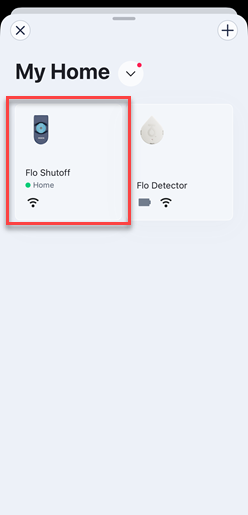
1. Open the menu, then select the Moen Flo Shutoff device for the Manual MicroLeak Test.
|
|
2. Scroll down to the bottom of the device's home page and locate the MicroLeak Test section. Tap Run MicroLeak Test.
|
|
3. Tap Start to confirm and run the MicroLeak Test.
|



Manually Run a MicroLeak Test from user.meetflo.com
Log onto user.meetflo.com with your Flo by Moen email and password. Select Manual Health Test.
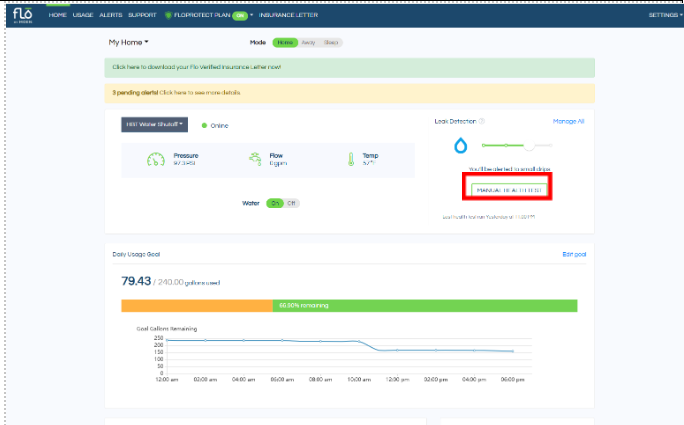
A pop up window will appear, select Yes.

Este artículo contiene información relevante sobre el Moen Flo Shutoff, que anteriormente se conocía como el sistema Flo Smart Water Monitor and Shutoff .
Este artículo contiene información relevante sobre la aplicación Moen Flo, que anteriormente se conocía como la aplicación Moen Smart Water Network, aplicación Moen Smart Wate, aplicación Moen y la aplicación Flo by Moen.