
How to unlink your Moen Flo Shutoff device
If you would like to unlink your Moen Flo Shutoff in the Flo by Moen app or Moen Flo app, please see the following instructions below.
After removing/unlinking the device from your account, you will lose all of your historical data permanently. This action is not reversible.
Aplicación Moen Flo |
|---|
|
1. Open the menu and then select the device you would like to unlink.
|
|
2. Tap on the Settings tab at the top of the screen.
|
|
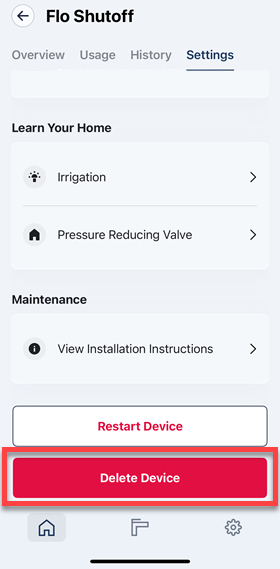
3. Scroll to the bottom and tap on Delete Device.
|
|
4. Tap on Yes, Delete Device to confirm.
|



Aplicación Flo by Moen |
|---|
| 1. From the Flo by Moen app, select the menu button on the top left and select the location where the device is installed. |
| 2. Seleccione el dispositivo que desvinculará. |
| 3. Seleccione "Configuración del dispositivo" en la parte superior derecha de la aplicación. |
|
4. Deslícese hacia la parte inferior de "Configuración del dispositivo" y seleccione el botón "Desvincular dispositivo".
|

Este artículo contiene información relevante sobre el Moen Flo Shutoff, que anteriormente se conocía como el sistema Flo Smart Water Monitor and Shutoff .
This article contains information relevant to the Moen Flo App, which was formerly known as the Moen Smart Water Network app, Moen Smart Water app, Moen app, and Flo by Moen app.