
Error de la válvula
¿Qué significa Error de la válvula?
Valve Error is a system warning that the Manual Knob on your Flo Smart Water Monitor and Shutoff may not properly be in the Open or Close position or may not be properly synced with the app. While there is a Valve Error, your home may not be properly protected from water damage because the Flo Smart Water Monitor and Shutoff may not properly be working. Por lo tanto, es importante resolver este problema cuanto antes.
¿Qué debo hacer si hay un Error en la válvula?
- Open and Close Valve from the App: From the Control Panel in your App, try to Open and Close the valve. You can find instructions for opening and closing the valve in the app HERE. Si el interruptor On/Off (encendido/apagado) del panel de control está atenuado, o si usted no puede abrir ni cerrar el agua, es momento de inspeccionar el dispositivo Flo de monitoreo y corte de agua inteligente.
- Inspect for Debris: When looking at the Flo Smart Water Monitor and Shutoff, ensure that the Manual Knob on your device is free from any debris (leaves, twigs, pebbles etc.) that may restrict the ability of the valve to be fully Open or Close. If you notice any debris, carefully remove it from the device. Debris would prevent the valve from opening and closing.
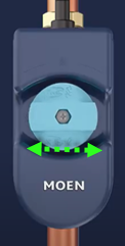
- Inspect the Manual Knob Position (Open/Close): of the Flo Smart Water Monitor and Shutoff to see if it’s in the Open or Close position. Si se encuentra entre la posición de Abierto o Cerrado, intente Abrir o Cerrar el maneral manual.
| Abra | Cerrado | Incorrect Position |
|---|---|---|
 |
 |
 |
Power Cycle the Device
- Unplug the Flo Shutoff power adapter from the outlet for 20 seconds.
- Plug the power adapter back in and wait 60 seconds for the boot process.
- Once the Shutoff is done restarting, verify the valve status light is solid. If the device was connected to a Wi-Fi network that is active, the Wi-Fi status light will be solid green.
It is preferred to unplug the power adapter from the outlet, but if you have a Battery Backup installed or if you need to unplug from the device, you can unplug the cord from the Shutoff:
- Unplug the power adapter from the Flo Shutoff for 20 seconds.
- Plug the power adapter back in by firmly pushing the power cord into the Flo Shutoff device and twist and turn while pushing the power cord until the second ring is completely in the device.

- Once the Shutoff is done restarting, verify the valve status light is solid. If the device was connected to a Wi-Fi network that is active, the Wi-Fi status light will be solid green.
If you have completed all of the above troubleshooting steps and your valve is not turning/actuate and you hear a click from the valve when it is trying to turn, but you can turn it manually, contact us. Please note if The VALVE light on the device is white/blue color.
 |
Valve Indicator Light
|
Preguntas frecuentes |
- I got this alert after receiving an Unusual Activity alert. What could be causing this?

Answer: This could mean that your valve is not closing all the way.
Para recibir consejos adicionales de solución de problemas, póngase en contacto con el soporte técnico del dispositivo Flo de monitoreo y corte de agua inteligente al 1-800-BUY-MOEN (1-800-289-6636), especialmente si se produce ruido o daños al accionar el apagado de su Flo Smart Water Monitor and Shutoff.